

Sales Navigator URL Generator
Create Sales Navigator search URLs instantly from natural language.
Want to turn your Sales Navigator URL into qualified leads?
Don't stop at generating searches. Export your Sales Navigator lists with Evaboot to get clean data and verified emails for your prospecting.
Trusted by
+3,500 companies
turn Sales Navigator lists into leads


































Evaboot is the only company I could find that easily enables users to quickly export Sales Nav leads to Excel. Additionally, the data enrichment aspect is very solid. The exported data also includes LinkedIn profile headlines and summaries which is a HUGE help. I'd much rather scan those in Excel than in Sales Nav. Lastly, JB and team also provide prompt support when needed. Would absolutely recommend.

Zach Ledner
Director of Partnerships at Voxel


Evaboot is the only company I could find that easily enables users to quickly export Sales Nav leads to Excel. Additionally, the data enrichment aspect is very solid. The exported data also includes LinkedIn profile headlines and summaries which is a HUGE help. I'd much rather scan those in Excel than in Sales Nav. Lastly, JB and team also provide prompt support when needed. Would absolutely recommend.
Zach Ledner
Director of Partnerships at Voxel
Generate Sales Navigator URL in Seconds
Building complex filters in Sales Navigator takes time. With our Sales Navigator URL Generator, you just describe your target audience in natural language and instantly get a search URL with all the filters pre-applied. Paste it into Sales Navigator and start prospecting right away.
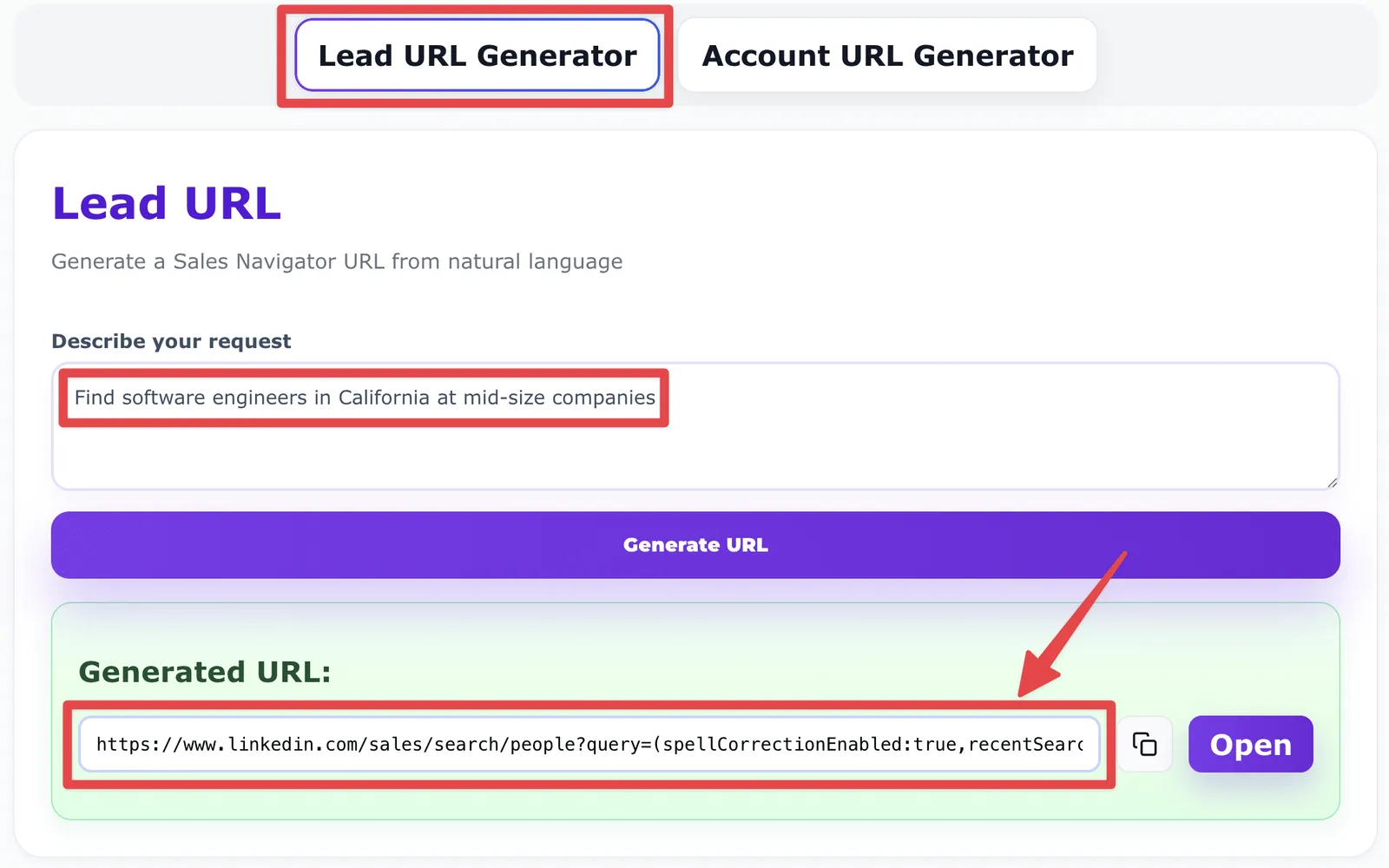
Lead Search URL Generator
Create a Sales Navigator lead search URL from a simple prompt.
Example: "Find software engineers in California at mid-size companies."
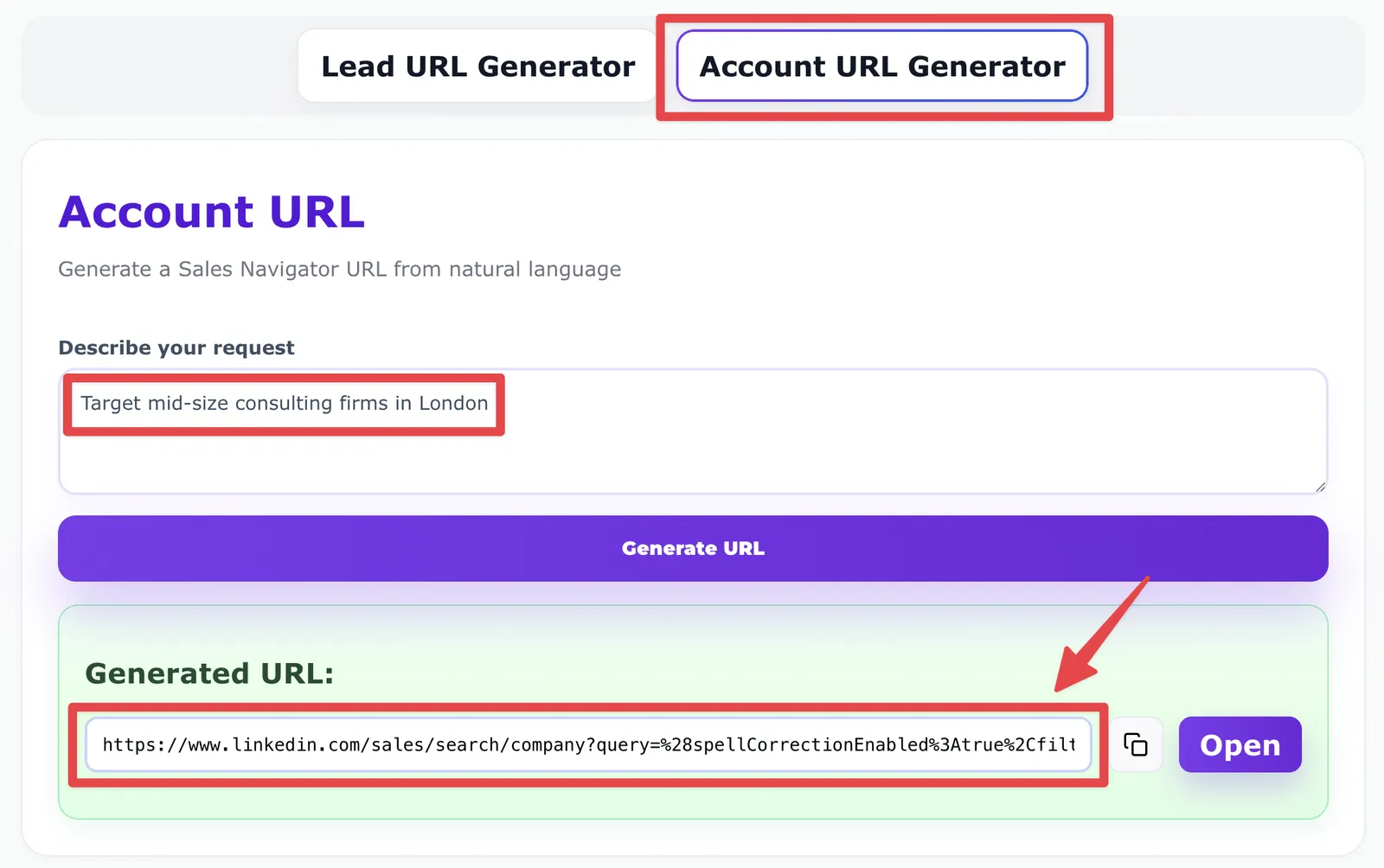
Account Search URL Generator
Generate account search URLs to target companies by size, industry, or location.
Example: "Target mid-size consulting firms in London."
What This Tool Does
- 01
No more manual filters Skip dropdowns and menus—just type what you need.
- 02
Smart prompts Detects job titles, industries, company sizes, and locations.
- 03
One-click output Instantly gives you a clean Sales Navigator search URL.
Why Use It?
- 01
Save time Go from idea to search in seconds instead of setting filters manually.
- 02
Reduce errors Get URLs formatted correctly—no missing or conflicting filters.
- 03
Scale faster Combine with Evaboot to export clean, verified lead lists directly from Sales Navigator.
Frequently Asked Questions
What is a Sales Navigator URL Generator?
A Sales Navigator URL Generator is a tool that creates ready-to-use LinkedIn Sales Navigator search links from plain text prompts.
How does the Sales Navigator URL Generator work?
Just describe your target leads or accounts, and the tool generates a Sales Navigator search URL with all filters applied.
What's the difference between Lead and Account URL Generator?
The Lead Generator builds URLs to find people, while the Account Generator builds URLs to target companies.
Which filters are included in the URL?
The Sales Navigator URL Generator can include job titles, company sizes, industries, locations, and keywords—all detected from your prompt.
Is the Sales Navigator URL Generator really free?
Yes, you can generate unlimited URLs for free. But if you want to export your search results into CSV and scale your outreach, you'll need an Evaboot subscription.
Why should I use Evaboot after generating my URL?
Because generating a URL is only the first step of your lead search. With Evaboot, you can export your Sales Navigator results into clean CSV files with verified emails.
More Questions?
Visit FAQBuild Smarter Searches, Find Better Leads
Learn how to use Sales Navigator filters, Boolean search, and exports to scale your prospecting.

How To Use Sales Navigator Boolean Search?
Learn how to use Sales Navigator Boolean Search to find your prospects and reduce errors in your keyword searches.

How to use LinkedIn Sales Navigator Search Filters?
Learn to generate new leads and company accounts easily with Sales Navigator Search Filters, and boost your sales strategy.
How To Export Lead Lists from LinkedIn Sales Navigator?
Learn how to create clean lead lists in one click from LinkedIn Sales Navigator with the Chrome extension Evaboot.
Export Leads From Sales Navigator


Create a clean B2B email list from LinkedIn Sales Navigator in just one click with the Evaboot Chrome Extension.
Export a list now